Book a Demo
Built inside Microsoft 365

Timesheets that actually work with your business

Track time, manage approvals, and generate invoices—without leaving Microsoft 365. No extra tools. No data duplication.
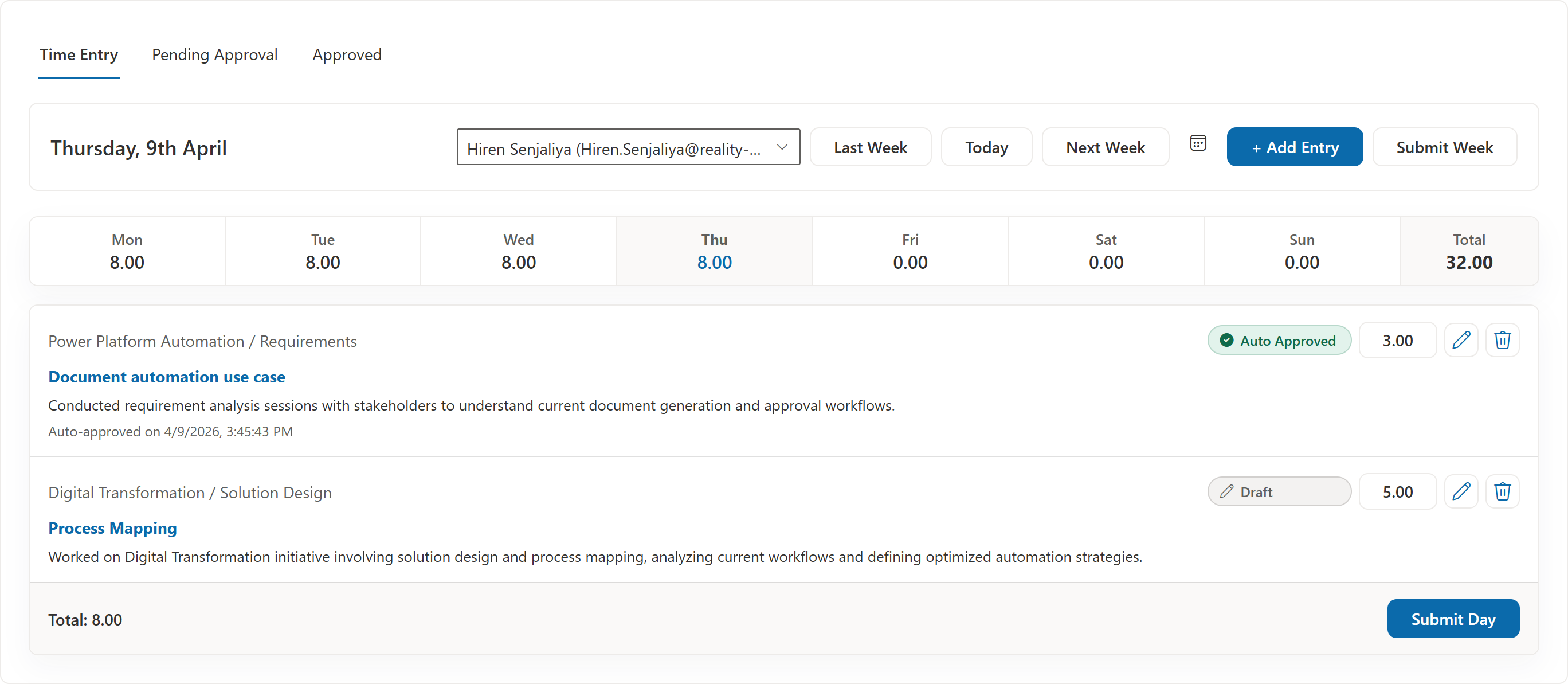
TimeOpera timesheet preview
60%
Lower Cost vs Typical Time Tracking Tools
0%
Confusion in Roles & Approvals
100%
Built to run inside your Microsoft 365

From Complexity to Control

Replace disconnected, manual work with one clearer system that makes time, approvals, and billing easier to manage.

Before
After
!Tools are disconnected
+Everything is in one place
!Entries are inconsistent
+Entries are structured
!Approvals are messy
+Approvals are streamlined
!Submissions are delayed
+Submissions are on time
!Invoicing is manual
+Invoicing is automated
!Visibility is limited
+Visibility is real-time
Why TimeOpera

Built inside Microsoft 365. Designed for real work.

No extra tools. No data duplication. Just a system that works with what you already use.

Simple, connected, and cost-effective

TimeOpera runs entirely within your Microsoft 365 environment—so your data stays in your tenant, your teams stay in familiar tools, and your costs stay under control.

01 No separate platform to manage or maintain.
02 All data stays securely within your Microsoft 365 tenant.
03 Up to 50–60% more cost-effective than standalone tools.
04 Works seamlessly with Teams and SharePoint.
What you get Why it matters
✔️ No Data Duplication
Avoid syncing issues and keep a single source of truth.
Faster Adoption
Users work in tools they already know—no training overhead.
🔒 Built-in Governance
Leverage Microsoft 365 security, compliance, and access control.
📈 Scales Easily
Supports teams of any size without performance impact.
💰 Lower Total Cost
No extra tools, licenses, or infrastructure to manage.
How It Works

A simple flow your team can follow

Straightforward for users, managers, and finance teams.

Step 1

Log time

Team members submit daily work entries with the right project and effort details.

Step 2

Approve effort

Managers review and approve timesheets using a clean, focused workflow.

Step 3

Track progress

Dashboards and reports show project activity, team effort, and status at a glance.

Step 4

Generate invoices

Convert approved time into invoices faster with less manual rework.

Roles & Access

The right access for every role - nothing more, nothing less.

Control who can view, edit, and approve - without complexity.

Role-based access you can trust

TimeOpera ensures every user has the right level of access - so teams work efficiently while maintaining control and governance.

01 Assign roles with clearly defined responsibilities.
02 Control access to data, actions, and approvals.
03 Maintain visibility without over-permissioning users.
Role Access & Responsibility
Timesheet User Limited Access
Create and manage their own time entries.
Project Manager Approval Access
Review, approve, and monitor team timesheets.
Finance Admin Billing Access
Access approved data for invoicing and reporting.
Administrator Full Control
Manage roles, permissions, and system configuration.
Features

Core features that keep time, approvals, and billing aligned

Focused on the workflows teams use every week, without unnecessary complexity.

Time Capture

Smart timesheets

Daily and weekly logging with clear entries and optional AI-assisted refinement.

  • Structured entry flow for faster submission
  • Clear project and effort mapping
  • Reduced rework before approval
Controls

Approval workflow

Configurable approvers, project-level control, and bulk approve or reject actions.

  • Role-aware review paths
  • Cleaner manager queues
  • Fewer status bottlenecks
Consistency

Automated reminders

Daily and weekly reminders with configurable schedules that respect holidays and weekends.

  • Built-in follow-up without manual chasing
  • Flexible timing per workflow
  • Better on-time submission rates
Visibility

Real-time dashboard

Weekly insights, project-wise effort breakdown, and a clean minimal UI.

  • See progress without exporting
  • Spot pending work quickly
  • Share a clearer weekly view
Billing

Invoicing made easy

Generate invoices from time entries, track paid versus pending, and use customizable templates.

  • Turn approved time into billable output
  • Track invoice readiness more clearly
  • Support faster finance handoffs
Governance

Role-based access

Admin, project manager, and user roles with controlled report visibility.

  • Give each role the right level of control
  • Reduce accidental access gaps
  • Keep setup manageable as teams grow
Use Cases

Built for teams that bill based on time and need clarity

A strong fit for project-based businesses that need control, visibility, and cleaner billing workflows.

Industry
IT services companies
  • Track project effort clearly
  • Keep timesheets, approvals, and invoicing aligned
Industry
Consulting teams
  • Review billable work faster
  • Support accurate client billing
Industry
Agencies
  • See team effort across customers and projects
  • Reduce admin overhead in weekly timesheet cycles
Industry
Project-based businesses
  • Improve control over approvals and reporting
  • Move approved time into billing with less friction
Reports & Insights

See effort, progress, and billing readiness clearly

Track the numbers that matter without building extra manual reports every week.

Project-level insights

Understand where hours are going and how work is distributed across projects.

User-level effort tracking

See individual effort patterns, submitted work, and approval status.

Export-ready reporting

Filter by customer, project, or date and export to Excel or PDF when needed.

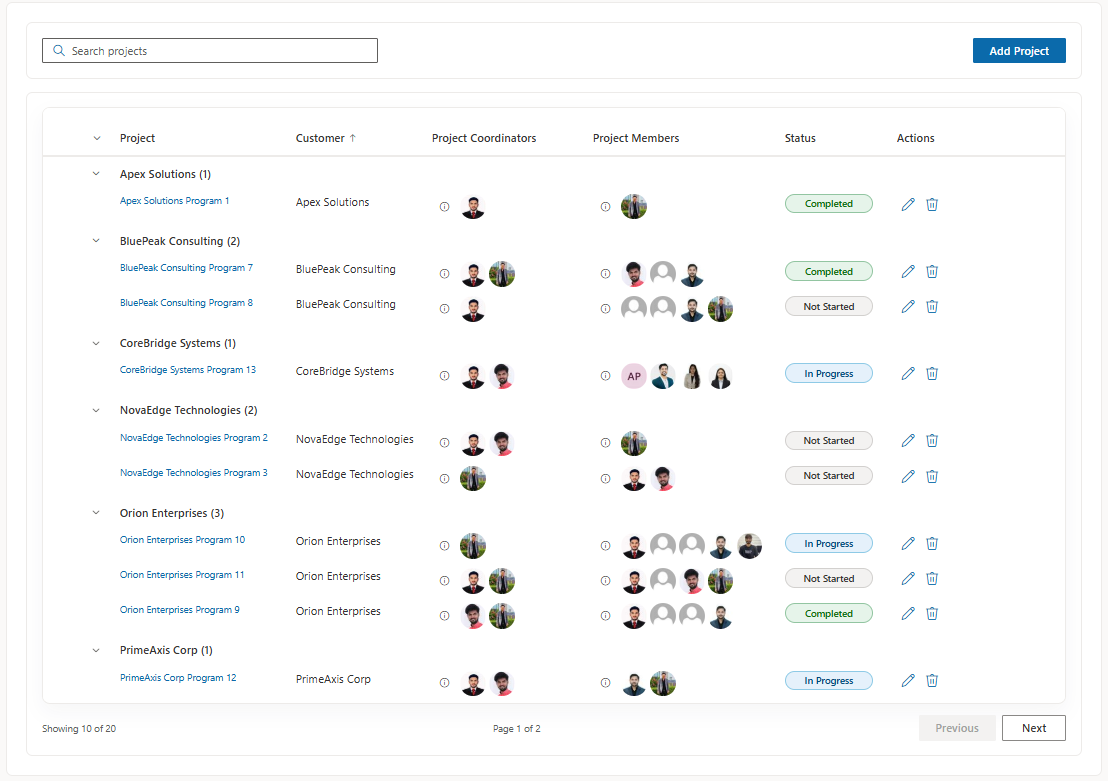
Product Preview

See the key screens at a glance

A clean product experience across timesheets, approvals, dashboards, and invoicing.
Book a Demo

See TimeOpera with your workflow in mind

Book a demo to see timesheets, approvals, reporting, and invoicing in a live walkthrough tailored to your team.

Live product walkthrough
Share your current process and we will walk you through how TimeOpera fits your Microsoft 365 setup, approval flow, and billing needs.
Book a Demo
Pricing

Request pricing for your team

Pricing is available on request while TimeOpera is being rolled out with early customers.

Simple next step
Tell us about your team, use case, and rollout plan. We will share pricing, demo the workflow, and help you evaluate fit.
Request Pricing
FAQ

Common questions

No. It combines time tracking, approvals, dashboards, reporting, and invoicing support in one workflow.
It is built for project-based teams such as IT services companies, consulting teams, agencies, and other businesses that bill based on time.
Yes. Approval workflows can be configured around project-level control.
Yes. Reports can be filtered by customer, project, user, and date, with export support for Excel and PDF workflows.
Yes. Approved entries are designed to support invoice generation and billing review.
Yes. TimeOpera is designed for Microsoft 365 and SharePoint-based environments.

Set up TimeOpera in Microsoft 365 and move from evaluation to rollout with clear step-by-step guidance.

Start Onboarding
Start with setup  ·  Continue with rollout